Monday, 3 December 2012
Texting: 20th anniversary
Sunday, 2 December 2012
Life in the information age: Hoax sites
Drawbacks
to the internet as a source of information
-It is easy to
publish on the internet; anyone across the world can do it.
-There are a
lot of unscrupulous businesses that have sprung up on the internet to take
advantage of people.
-Another growing problem
is that many information providers are finding means of charging for their
information that had been previously free.
-Hackers
can create viruses that can get into your personal computer and ruin valuable
data.
Examples of fake websites
This a fake website about an island where dogs are free to roam and bark and play all day long. Think dog sanctuary and you're there. Contains photographs, a rate card and many other resources.
Clearly nonsensical, but the question is - do these people really believe in
what they're saying, and are just nuts, or are they creating a spoof site and
they know it?
How do you know a site is real?
Many websites are scams trying to get money or personal
information from honest, hard-working people. Real websites represent
legitimate companies.
If there is not a full address with a house number or phone number for the company is most likely it is a hoax website. Check the copyright date on the website. This is often listed at the bottom of the home page or the contact page. Current dates are more reliable than older dates, although some legitimate websites were created many years ago. Check the website to see if there is a Better Business Bureau logo. These logos indicate that the website owner is an approved member of the BBB.
Monday, 26 November 2012
Legislation and ict
The data
protection act data is a law designed to protect personal data store on
computers or paper filled system. There are eight
principles put in place by the Data Protection Act 1998 to make sure that
individual’s
information is handled properly:
• be fairly
and lawfully processed;
• be
processed for limited purposes
• be
adequate, relevant and not excessive;
• be
accurate and kept up-to-date;
• not be
kept for longer than is necessary;
• be
processed in accordance with data subject's rights;
• be kept
secure;
• not be
transferred to countries without adequate protection.
The DPA
sets up right for people who have kept data about them.
A Right of Subject Access-A data subject
has a right to be supplied by a data controller with the personal data held
about him or her. The data controller can charge a
fee for this.
A Right of Correction- A data subject
may force a data controller to correct any mistakes in the data held about
them.
A Right to Prevent Distress- A data
subject may prevent the use of information if it would be likely to cause them
distress.
A Right to Prevent Direct Marketing- A data
subject may stop their data being used in attempts to sell them things.
A Right to Prevent
Automatic Decisions- A data
subject may specify that they do not want a data user to make
"automated" decisions about them where, through points scoring, a
computer decides on, for example, a loan application.
A Right of Complaint to the Information Commissioner- A data
subject can ask for the use of their personal data to be reviewed by the
Information Commissioner who can enforce a ruling using the DPA. The
Commissioner may inspect a controller's computers to help in the investigation.
A Right to Compensation- The data
subject is entitled to use the law to get compensation for damage caused if personal
data about them is inaccurate, lost, or disclosed.
If someone is on a social networking site and
puts their address, name, number, email addresses and list of hobbies onto their Facebook page
the rights of that information has to stay on that page. Facebook cannot pass
on their information to other sources. This will prevent the use junk email or
any cold calling.
Thursday, 22 November 2012
Ecommerce
What is E-commerce?
E-commerce is the buying and selling of good or service using the internet or any other electrical systems.E
E-commerce is used for businesses to market their product or service to get sales and the exchange of data of data to facilitate the financing and payment aspects of business transactions. Common uses of e-commerce are: online shopping, instant messaging, online banking, social networking and teleconferencing.
This website is using e-commerce by selling products online, ranging from clothes to consoles.
A good way for companies or future entrepreneurs to advertise their business is via Facebook. There main advantages to advertising your business on Facebook is that it is free and it has over 400 million users. Furthermore it's a great way to expose your brand to a wide audience using pages, events, and groups. In addition it's great way to engage with customers and potential customers. You can share business videos, special offers, news and content. Moreover it's a great way to receive feedback from consumers, they can post comments and use discussion boards about your service or product. You can create a Facebook homepage for your business where active users can become a fan of your page to engage your brand.
Once use have created you Facebook page you can advertise your business and website, contact information and description of your business. You must consistently update your page to keep the customers engaged and interested so that your e-business will be successful.
Wednesday, 21 November 2012
Employment opppurtunities
Emplopyment opportunities
The employment oppurtunities have changed dramtically as the result of ict. There are three vital aspects of this are automation, globalisation and flexibilitty. One way the use of ict has changed CNC. CNC is a computer numerical control is a method of controlling industrial machinery: the most common application being turning machining such as lathes. The machines are programmed to perform a task rather than being set up, manually, which makes them potentially eaiser to use, faster and more accurate.
Office applications that can be used for small businesses or businesses in general

Microsft Word
Word can be used to sent invoices, receipts and letters to clients or consumers. Word is mainly used for word processing. Word offers the ability to type and lay out reports, memos, letterheads, and lytother written business papers. Word has several key built-in functions, including bold, italics, underlining, super- and sub-script, paragraph and line formatting, bullet points, and so forth. The page layout function allows users to customize the size and format of the paper they are trying to create.
Micrsot excel
Excel is good for organizing information into tables. If you are compiling statistics, creating a list of contacts, performing experiments or maybe assembling a tally of various data, this program is for you. One great feature about this program is being able to organize various things into neat, well-defined columns. Once those columns are organized, there are numerous ways to sort information.
Excel spreadsheets are perfect for the small business that needs to track sales trends throughout the months and years. It helps businesses notice changes in sales, so the business is able to act and correct the problem. The spreadsheets can be used to create graphs and presentations of quarterly sales for business associates and investors.
Paper-based sytem vs Database system
paper-based system can only be organized in a single way, cannot be easily searched, cannot be easily modified, cannot be accessed remotely, cannot be conveniently cross-referenced, maintained and updated, protected, and cannot be expanded without considerable effort.
computer-based information system may be considered to be more cost effective and efficient than a manual system. It speeds up operations and can back up important information at the touch of a button. It is however very expensive to set up and may need to be maintained by IT technical support advisors on a regular basis.
An information system does not only refer to the way in which business data is stored by a company. It also refers to the way in which the business interacts with clients or associates, processes orders and advertises.

Job oppurtunities
New Jobs (those that were created by the technology)
The employment oppurtunities have changed dramtically as the result of ict. There are three vital aspects of this are automation, globalisation and flexibilitty. One way the use of ict has changed CNC. CNC is a computer numerical control is a method of controlling industrial machinery: the most common application being turning machining such as lathes. The machines are programmed to perform a task rather than being set up, manually, which makes them potentially eaiser to use, faster and more accurate.
Office applications that can be used for small businesses or businesses in general
Microsft Word
Word can be used to sent invoices, receipts and letters to clients or consumers. Word is mainly used for word processing. Word offers the ability to type and lay out reports, memos, letterheads, and lytother written business papers. Word has several key built-in functions, including bold, italics, underlining, super- and sub-script, paragraph and line formatting, bullet points, and so forth. The page layout function allows users to customize the size and format of the paper they are trying to create.
Micrsot excel
Excel is good for organizing information into tables. If you are compiling statistics, creating a list of contacts, performing experiments or maybe assembling a tally of various data, this program is for you. One great feature about this program is being able to organize various things into neat, well-defined columns. Once those columns are organized, there are numerous ways to sort information.
Excel spreadsheets are perfect for the small business that needs to track sales trends throughout the months and years. It helps businesses notice changes in sales, so the business is able to act and correct the problem. The spreadsheets can be used to create graphs and presentations of quarterly sales for business associates and investors.
Paper-based sytem vs Database system
paper-based system can only be organized in a single way, cannot be easily searched, cannot be easily modified, cannot be accessed remotely, cannot be conveniently cross-referenced, maintained and updated, protected, and cannot be expanded without considerable effort.
computer-based information system may be considered to be more cost effective and efficient than a manual system. It speeds up operations and can back up important information at the touch of a button. It is however very expensive to set up and may need to be maintained by IT technical support advisors on a regular basis.
An information system does not only refer to the way in which business data is stored by a company. It also refers to the way in which the business interacts with clients or associates, processes orders and advertises.
Job oppurtunities
New Jobs (those that were created by the technology)
- Web Designer
- Network Administrator
- IT Consultant
- IT Teacher
- Games Designer
- IT technicians
- Computer Sales
- Software Engineers
- Hardware Engineer
- Manufacturer of Technology
- Programmers
- Technical Support (Call Centres)
- Computer Security System Designer & Testers
- U-Tube Video makers
- Website managers
- Database managers
Thursday, 8 November 2012
Chat and instant messaging:sms
sms
SMS text messaging is the most widely used data application in the world, with 3.6 billion active users, or 78% of all mobile phone subscribers.
SMS works on a store-and-forward basis. Instead of being sent directly to the recipient, SMS messages travel through several important nodes befor
e reaching the recipient (skip this part if you find it boring; there's more good stuff below).
How does sms work?
-
The SMS message is submitted to your wireless service provider's SMS
Center.
-
After the message is processed internally, the SMS Center sends a request to
the Home Location Register (HLR) and receives the routing information for the
recipient.
-
The SMS Center sends the message to the Mobile Switching Center (MSC).
-
The MSC collects the recipient's information from the Visitor Location
Register (VLR) and, sometimes, proceeds with an authentication operation.
-
The MSC forwards the message to a Mobile Server.
-
If the recipient has a Treo or VisorPhone, the SMS is placed on the SIM card
until the handheld picks up the message and transfers it to the internal memory
on the unit.
This is how Treos and VisorPhones can store hundreds of SMS messages, unlike ordinary GSM mobile phones that store only a few SMS messages.
Treo or VisorPhone owners may encounter the error message "Your SIM contains at least one SMS message. Do you want to move the message to your Visor?" See the relatd SMS article in our knowledgebase for details.
-
The MSC returns the outcome of the Forward Short operation to the SMS
Center.
- The SMS Center reports delivery status of the short message back to the sender.
Monday, 5 November 2012
Working styles tool man
ICT is transforming the way people live in virtually every area of their lives. ICT has affected work styles positively in that it has helped manage and process information faster, conveniently and cheaply. ICT has helped reduce company running costs by reducing paper work, effective time management through better means of communication and faster turn around times in regard to output. This has resulted in higher productivity and effective management styles. In the working population ICT has come as custom to major cooperation's. Shop assistants use EPOS and EFTPOS(payment systems) and stock control systems. EPOS- Electronic point of sale is a computerized till connected to a price look up database, and possibly to the live stock databases. EFTPOS- Electronic funds transfer at point of sale. A system that allows debit cards to be used to pay for goods. The funds are transferred automatically by the machine at the till from the buyer's bank account to the seller's. Car mechanics use computerized analysis equipment to diagnose many of the faults that they are presented with. Even teachers are expected to use PCs network interactive whiteboards and wide range of software.

PDA
personal digital assistant (PDA) is a mobile device that functions as a personal information manager. PDAs are largely considered obsolete with the widespread adoption of smartphones.
Features
PDA has an electronic visual display, allowing it to include a web browser, all current models also have audio capabilities enabling use as a portable media player, and also enabling most of them to be used as mobile phones. Most PDAs employ touchscreen technology.PDA use can access your emails via the internet using WiFi. Most PDAs can synchronize their data with applications on a user's computer. This allows the user to update contact, schedule, or other information on their computer.
GPS
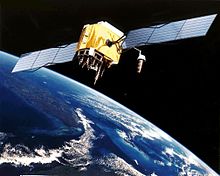
The Global Positioning System (GPS) is a space-based satellite navigation system that tells you the location and time information in all weather, anywhere on or near the Earth, where there is an unobstructed line of sight to four or more GPS satellites. It is freely accessible to anyone with a GPS receiver. GPS provides specially coded satellite signals that can be processed in a GPS receiver, enabling the receiver to compute position, velocity and time.
Laptop
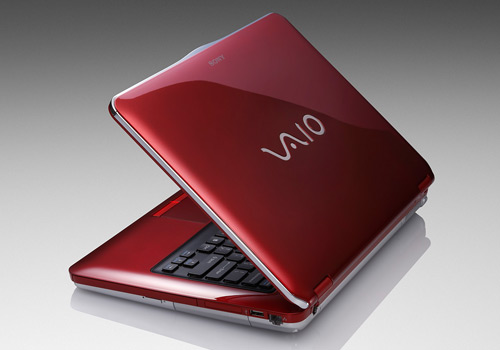
Laptops
were made for increased convenience to travelling business man or casual surfers.
The Laptop is lightweight and portable unlike a desktop computer; however it
has the same characteristics. The laptop computer has a built in touch pad so
that it can be operated without a mouse. Furthermore it has the processor,
memory, operating system, hard drive, and monitor. Laptops are unique from
other computers, in that it is difficult to exchange parts between laptops and
desktops, and replacement parts for laptops can be pricier than most. However,
this disadvantage is greatly out measured by the speed, connectivity, and
economical value that laptops possess over standard computer models.
Disadvantages of having the latest technology
However there are several disadvantages for him in employing a lot of ICT. Firstly with any new technology at one point in time there will big a possibility that it will break or have a fault because companies build their products in obsolete, so you will buy more of their products, therefore getting more profit. This can be costly replacing or fixing these technology. Another factor could be that the constant use of the internet that you could catch a virus or a Trojan horse. This could damage your computer by corrupting the files, therefore the files wouldn't work and it would be hard for John to work efficient.
Disadvantages of having the latest technology
However there are several disadvantages for him in employing a lot of ICT. Firstly with any new technology at one point in time there will big a possibility that it will break or have a fault because companies build their products in obsolete, so you will buy more of their products, therefore getting more profit. This can be costly replacing or fixing these technology. Another factor could be that the constant use of the internet that you could catch a virus or a Trojan horse. This could damage your computer by corrupting the files, therefore the files wouldn't work and it would be hard for John to work efficient.
Subscribe to:
Posts (Atom)